

If you live with ADHD, a chronic illness, age-related memory loss, or any other condition that affects your working memory, you know how frustrating and exhausting it is when you struggle to remember basic things like where you put your keys, what you did yesterday, or whether you already took your meds. Some people are great at writing things down, but without a system to organize notes and tasks, they still get lost. Memory issues can even become costly when you miss an appointment or forget to pay bills.
The memory support strategies that work for me may not always work for you, but most can be modified, and trying them out is low-cost and low effort. It can take some trial and error to tailor them to your specific needs, but setting up a sustainable system is invaluable when you have a limited amount of energy and executive function.
7 Helpful Memory Support Strategies
1. Calendars
Digital Calendars
Using your smartphone’s built-in calendar is a great way to keep track of appointments, events, and anything else you need to remember to do on a certain day. However, adding every little thing to your calendar can get overwhelming and deter you from using it. Here’s how I get the most out of mine:
- Use it for appointments, social plans, birthdays, and other important events
- Add location details for in-person events, and links for virtual ones
- Add any access details in the “notes” section
- Color-code for each type of event
- Set recurring events for frequent repeating appointments
If notifications are helpful for you, you can set your calendar to remind you a certain amount of time prior, or remind you when you need to leave.
Physical Calendars
Digital reminders are great, but for me, it’s not enough. I need a physical, visual reference to fully comprehend everything I have going on during the week or month. This is where physical calendars come in. The type you use will depend on personal preference, but some options are:
- Monthly paper wall calendar, purchased yearly
- Monthly paper desk calendar, purchased yearly
- Dry-erase or chalkboard monthly calendar, purchase once and reuse
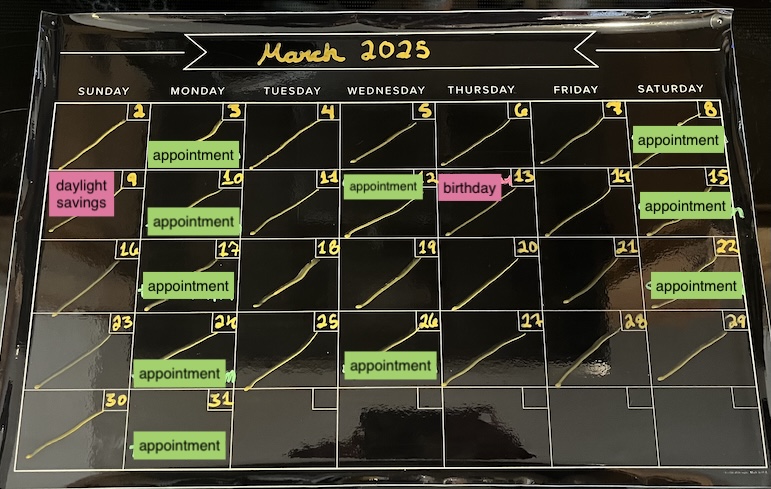
I keep a magnetic chalkboard calendar on my refrigerator, so I see it frequently throughout the day. Here’s how I use it:
- Appointments, important birthdays, social plans, holidays
- If you live with other people and don’t want all the details visible, you can create a code for yourself (for example, if you go on a lot of dates, you can choose a symbol to represent each person you see)
- Color-code types of events (ideally, the colors match the code in your digital calendar)
- My categories are medical appointments, social plans, birthdays/holidays, and work events
- Take a photo at the end of the month and store in a dedicated album
- This helps me remember what I did when, and doubles as a contact-tracing tool
In the past, I’ve also used it to help track menstrual cycles, moon phases, and more.
2. Phone Notifications
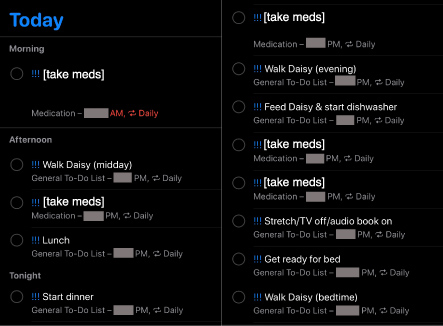
When you have many little things to remember throughout the day, putting them on a calendar can be too overwhelming and make it easier to miss things. Of course, if you already know this works for you, keep doing it! If not, try taking advantage of the built-in Reminders app on your smartphone. I use reminders for daily tasks like:
- Taking meds
- Walking my dog
- Starting meals
- Loading the dishwasher
Reminders help ensure I get things done when they need to be done, and help validate that I’ve already done them, so I don’t have to think about it. I also use them for less frequent recurring tasks like:
- Ordering med refills
- Monthly parasite preventative for my dog
It can also be helpful to create groups for your notifications, which are also color-coded. If notifications aren’t enough to get your attention, setting alarms can be a useful alternative.
3. Daily To-Do Lists
If the words “to-do list” make you shudder, you’re not alone. I used to abhor them myself, until I figured out how to make them work for me. This one especially might take a lot of trial and error, but for me, it paid off. The trick is to figure out what you can actually accomplish in a day, so your list is achievable.
I use a full-size spiral-bound notebook that sits open next to my favorite seat on the couch, so I see it frequently and can easily reference what I did on certain days of the week before, which helps me remember to add repeating tasks like cleaning, organizing my meds, etc. I make lists for each day of the week, and keep a running list of non-urgent tasks at the top of the page so I can easily add them in when it makes sense. Color-coding with highlighters or colored pens/pencils can also help differentiate types of tasks. Appointments and other events go on these lists as well, which helps me remember them and helps prevent me from overcommitting myself.
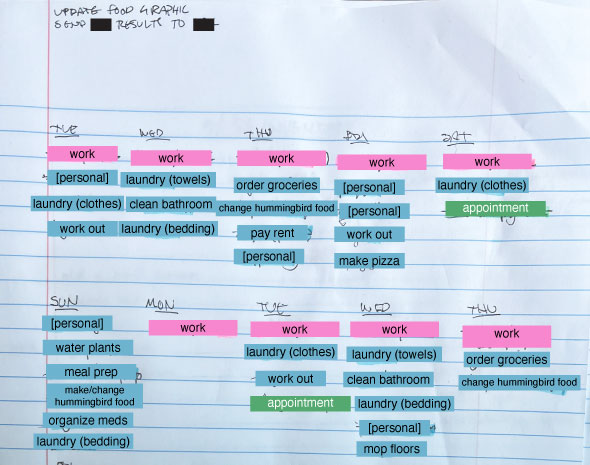
On days when my brain fog is especially bad, I’ll assign numbers to tasks to help me complete them in the most efficient order, and sometimes I’ll break down each piece of a task into what I call “order of operations.” This can be especially helpful for people with ADHD and involves writing a separate, numbered list, which might be in the margin of my notebook page or on a dry-erase board. Laundry, for example, can be broken down into about five (or more) steps:
- Gathering items
- Putting them into the wash with detergent
- Moving the load to the dryer
- Taking it out of the dryer
- Folding and putting away
4. Medical Notes and Symptom Tracking
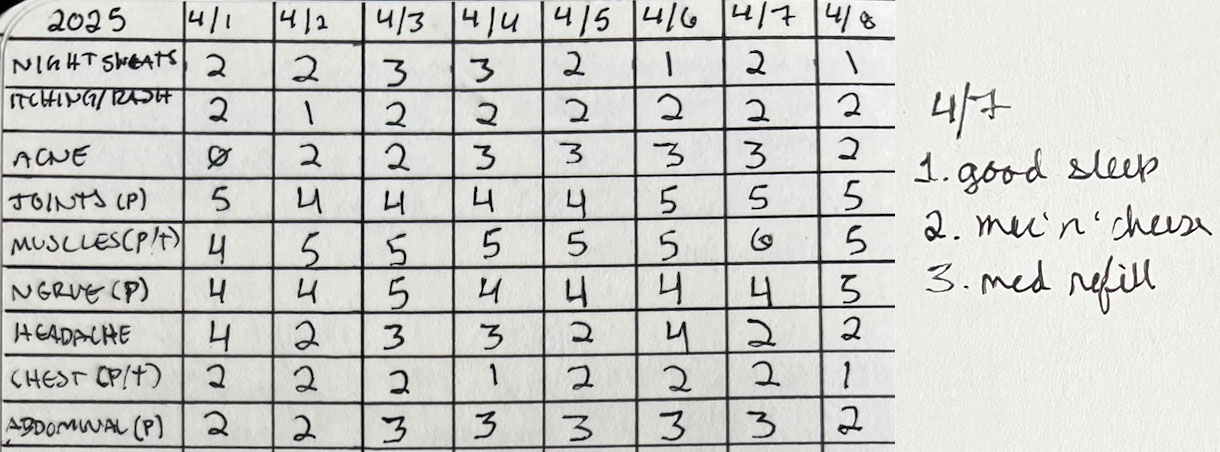
Does your mind tend to go blank when you’re at an appointment and the provider asks you to describe your recent symptoms? Logging your symptoms daily, or at least most days, can help give you and your providers a clearer picture of your health. I have a dedicated journal where I track mine using a system I honed over time, and a separate spiral notebook where I jot down questions for my providers and take notes during appointments. I also make short daily gratitude lists in my symptom journal to help track my wins. If you don’t want to make your own tracker, there are plenty of pre-made options you can buy.
5. Pill Organizers
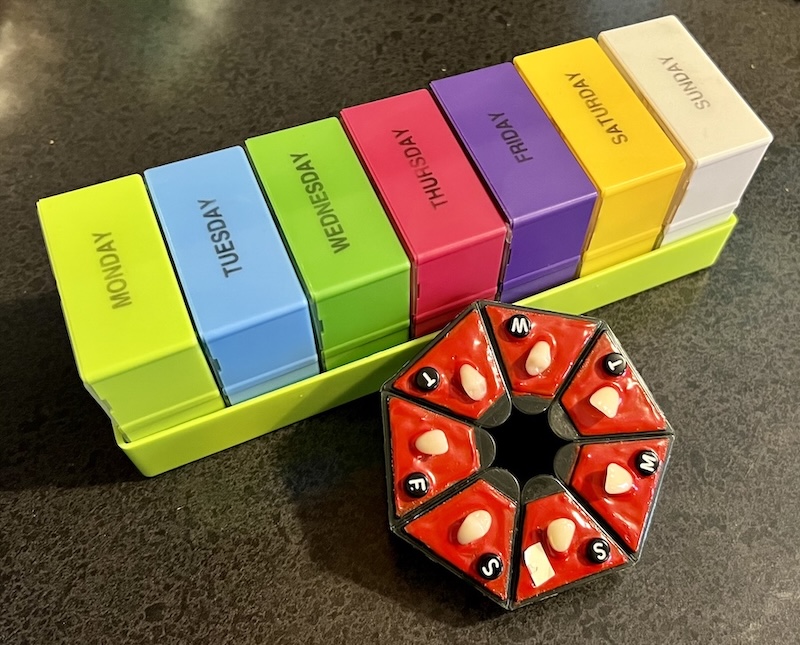
If you struggle to remember whether you’ve already taken your meds, or you forget to take them at all, pill organizers can simplify your routine. Remembering to fill them each week can be difficult, so make sure to set a reminder, put it on your to-do list on the same day every week, or both. If it feels like too much of a chore, consider getting a fun pill organizer to make filling and taking your meds more enjoyable.
6. Designated Places for Important Items
Keys, wallet, phone – how often are you scrambling to find one or more essential item as you’re heading out the door? I once lost my keys for an entire day because they somehow ended up in my bed, and I have similar stories for my wallet. Choosing a designated place to keep your most important items helps ensure you leave on time and avoid panic. I like to keep my keys on a hook because they’re less likely to get knocked behind furniture.
This tip also applies to assistive devices like glasses and mobility aids. I have a dedicated spot for my glasses, cane, fidgets, and compression gloves in each room.
7. Whiteboards, Everywhere
Dry-erase or chalkboards are a must-have for the constantly forgetful. You can never have too many, and I suggest keeping one in every room if you can. I have one next to my desk for anything work-related, and one on the fridge to help remember to add items to my grocery list, quickly note recipe modifications while I’m cooking, and other random reminders. I also keep a waterproof notepad in the shower.
Implementing any new habit takes time, so if you decide to try any of these ideas, please give yourself grace as you adjust. Ideally, whichever strategies you explore will become second nature with practice. Using redundant systems like noting appointments in three different places (digital calendar, physical calendar, and daily to-do list) help ensure nothing gets missed. If you try any of my memory support tips for ADHD and memory loss, let me know! I’m also here if you need help adopting or modifying any of them to meet your unique needs.

Leave a comment